This is where we try different things to learn and have fun. IT, RC, Carpentry/Woodworking, Snowmobiles/Cars, Welding/Metal, etc.
This is mainly our own family and some friends.

This is where we try different things to learn and have fun. IT, RC, Carpentry/Woodworking, Snowmobiles/Cars, Welding/Metal, etc.
This is mainly our own family and some friends.

A batch of Windows Server 2025 machines, all deployed from the same image, started failing the latest cumulative update with 0x80073712. The network was fine and the update client was fine. DISM /RestoreHealth didn’t help, because the real problem was a corrupt en-gb language pack baked into the golden image. Finding that took far longer than it should have. So I built a toolset that works the problem in a fixed order and points at the actual cause instead of sending you round a blind repair loop. ...

Every new Ubuntu VM on the XCP-ng pool needed the same post-install housekeeping — updates, timezone, NTP, guest tools, a few baseline packages — done by hand, every time. Instead of repeating that checklist again, I put together a bash script that does it in one pass and only touches the system when told to. https://github.com/tobiastillstam/Ubuntu-vm-bootstrap Post-install housekeeping for a freshly installed Ubuntu VM. Detects current state and reports it; only changes anything when --fix is given (always previewable via --dry-run). ...
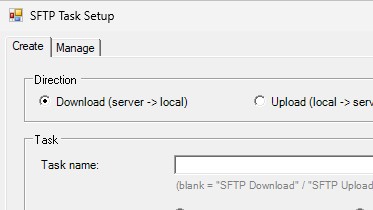
First ever repo committed to Github. After troubleshooting Powershell scripts that upload and download with sftp as scheduled tasks over the years I decided to put together a toolset that would make creating and maintaining these scripts/tasks a lot easier. https://github.com/tobiastillstam/Sftp-Scheduled-Task-Toolset A PowerShell toolset for unattended SFTP file transfers on Windows, run as scheduled tasks. Includes a WinForms GUI for creating and managing transfer jobs. Built around the WinSCP .NET assembly. Designed for sysadmins who need reliable scheduled SFTP transfers (downloads, uploads with local archive, or both), without writing a one-off script per server. ...

Background I wanted to try Omarchy and as per usual I installed it as a VM before committing to running it on my hardware. However I ran into some problems, it took me avail to figure it out. Thought I’d write it down for myself and perhaps for those with the same problem. Root Cause The root cause is that VMware dosen’t provide the grahics that Omarchy expects and can automatically handle. This gives you a desktop/GUI that’s non functional. ...
This applies to different scenarios but perhaps most common is a virtual machine which needs more disk space. This guide assumes you have extended the disk in your hypervisor. This guide is for non LVM, if you’re running lvm check this post instead. Check disk by listing them with: fdisk -l Partition size by running: df -h If the new size isn’t listed/shown, we have to scan for changes: ls /sys/class/scsi_device/ ...
This applies to different scenarios but perhaps most common is a virtual machine which needs more disk space. This guide assumes you have extended the disk in your hypervisor. Check disk by listing them with: fdisk -l Partition size by running: df -h If the new size isn’t listed/shown, we have to scan for changes: ls /sys/class/scsi_device/ Example output could be: 2:0:0:0 3:0:0:0 32:0:0:0 The scan all devices individually: echo 1 > /sys/class/scsi_device/2\:0\:0\:0/device/rescan echo 1 > /sys/class/scsi_device/3\:0\:0\:0/device/rescan echo 1 > /sys/class/scsi_device/32\:0\:0\:0/device/rescan ...

RHEL9 dnf install https://dl.fedoraproject.org/pub/epel/epel-release-latest-9.noarch.rpm -y dnf install xe-guest-utilities-latest -y systemctl enable --now xe-linux-distribution Ubuntu 24.04 LTS apt install xe-guest-utilities systemctl start xe-daemon systemctl enable xe-daemon
Set TimeZone: sudo timedatectl set-timezone Europe/Stockholm Set NTP pool to be usesd. Edit /etc/chrony.conf. Look for and change the line “pool…” to “pool ntp.se iburst”. sudo nano /etc/chrony.conf pool ntp.se iburst Control+O Enter Control+X Restart chrony service and check it’s status: sudo systemctl restart chronyd sudo systemctl status chronyd
This is how I added TimescaleDB to my PostgreSQL-server and enabled it on my existing Zabbix database. I found alot of helpful artikels and reference material at initMAX ( https://www.initmax.com/ ), which made everything easier. In short this is my setup. Three servers running Ubuntu 24.04 LTS, one for Zabbix server, another for Zabbix frontend and lastly a PostgreSQL(v16) server. We will be working almost exclusively on the Postgres server and the other two just to stop and start the services when we enable TimescaleDB. ...
These instructions are for Ubuntu 24.04 LTS but would work on other versions and flavours with some modifications. We’ll start on the client side. Open a terminal or connect via SSH. Either prefix all commands with sudo or run sudo su -, just remember to exit after you’re done. First install the agent, skip if it’s already installed. wget https://repo.zabbix.com/zabbix/7.0/ubuntu/pool/main/z/zabbix-release/zabbix-release_latest_7.0+ubuntu24.04_all.deb dpkg -i zabbix-release_latest_7.0+ubuntu24.04_all.deb apt update apt install zabbix-agent2 zabbix-agent2-plugin-* systemctl enable zabbix-agent2 Generate PSK-key and write it to file. ...